
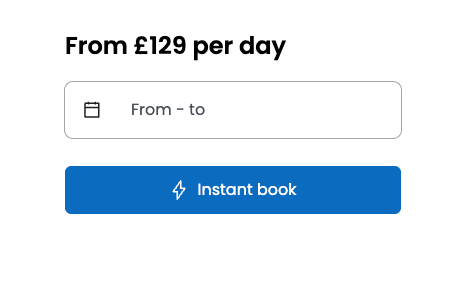
Yes. Instant Book is an optional setting that lets hirers book your vehicle in one step, without waiting for you to approve the request. The booking is confirmed as soon as the hirer pays.
Why switch it on?
- Increased bookings - on average 20% more bookings
- Increased revenue - More bookings can lead to increased revenue
- Improved hirer experience - guests have a seamless and hassle-free booking process.
- Hirers can book straight away, so you’re less likely to lose them to another listing while they wait for a reply.
How to set up Instant Book
Instant Book is set per vehicle. If you have more than one vehicle, repeat these steps for each one you want on Instant Book.- Log in to your Owner Dashboard.
- Select Listings in the left-hand menu.
- Find the vehicle and click Manage Listing.
- Select Pricing from the list of sections.
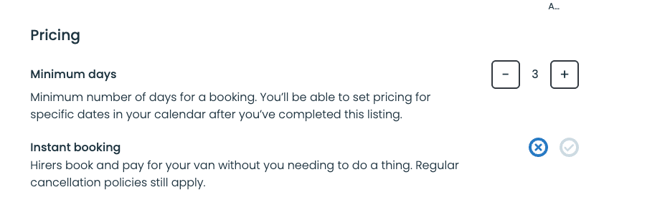
- Next to Instant booking, click the tick to switch it on.
- Click Save & continue. The change applies straight away.
Instant Book isn’t available for Deliver hires.
What to expect
- You won’t review each booking first so make sure the listing tells hirers everything they need to know
- Notice period: hirers can’t instantly book the next two calendar days, so you always get at least two days’ notice.
- Payment: hirers have 12 hours to complete payment, or the booking times out.
- Your settings still apply: variable pricing, minimum hire length and iCal calendar syncing all work with Instant Book.
- Cancellations: your usual cancellation policy applies.
- Questions from hirers: hirers can’t send a request for approval on an Instant Book vehicle, but they can still message you before they book.
- Other vehicles: any vehicle without Instant Book stays as request to book.
As you won’t review each booking first, make sure the listing tells hirers everything they need to know:
- Description: include the layout and beds, what’s provided, and any weight limits (for example, on a pop-top roof).
- Additional information: include practical details such as parking.
- Specific hiring rules: set out your rules, for example no pets, no smoking, no festivals, minimum driver age, mileage limits, fuel and cleaning expectations, and what to do in an emergency.
- Calendar and prices: keep these up to date so hirers only book dates you can do, at the right price.
Key Instant Book questions:
What if I receive an Instant Book booking that I don’t want to accept?
To give you notice, hirers can’t instantly book the next two calendar days, so every Instant Book hire starts at least two days after it’s made. If you need to cancel a booking, the usual cancellation policies apply.
The best way to avoid unwanted bookings is to keep your calendar up to date and set clear hiring rules (see below). If a hirer messages you before booking through Message Before You Book, reply quickly. You can let them know before they book if your van isn’t right for their trip.
Not every hirer will message first, so your listing and hiring rules are still the main safeguard.
Does Instant Book work with variable pricing, minimum days and calendar syncing (iCal)?
Yes. Instant Book works alongside your date-specific prices, minimum days and synced calendars, so hirers can only book dates and prices you’ve set. Read more about ical here.
How does booking work for a hirer?
Hirers are told during checkout that the booking will be confirmed as soon as they pay. Once they place the booking, they have 12 hours to complete verification and payment. Your calendar is blocked for those dates straight away. If the hirer doesn’t pay within 12 hours, the booking is cancelled and the dates reopen automatically. The usual payment policies apply.
Can I accept same-day bookings if I choose to use Instant Book?
No. Same-day and next-day bookings are blocked for Instant Book vehicles. If a hirer tries to book these dates, they see the message: “Instant bookings can only start the day after tomorrow.”
Is Instant Book set per vehicle or for my whole account?
Per vehicle. If you have more than one vehicle, you can switch Instant Book on for some and leave others as request to book. Once it’s on for a vehicle, all bookings for that vehicle are instant, and hirers can no longer send a booking request for your approval.
Can hirers still ask me questions before booking?
Yes. With Message Before You Book, hirers can message you before they book, for example about beds, pick-up arrangements or parking. It arrives as a normal message but without a booking reference, as no booking has been made yet. These messages show real interest, so a quick, detailed reply can often secure the booking.
What should my listing include before I switch on Instant Book?
As you won’t approve each booking, your listing needs to give hirers the full picture before they book. This helps avoid cancellations.
-
Description: van and bed layout, what’s provided (for example, linen and kitchen equipment), and any weight limits, such as for a pop-top roof.
-
Additional information: practical details, such as whether there’s parking for the hirer’s car during the hire.
-
Hiring rules: clear rules for the hire itself (for example, no smoking, maximum 100 miles a day) and the types of booking you won’t accept (for example, no festivals, no travel abroad).
Example Hiring Rules
- No off-road - unsealed roads must be pre-approved in writing in Camplify Messages before the trip.
- No smoking inside the vehicle.
- No pets.
- No festivals.
- No hen or stag parties.
- Driver age restrictions (21 or 25 and add maximum age too).
- Awning must be packed away before bad weather arises/leaving the van/overnight.
- Standard pick-up / drop-off times are X.
- No free-camping.
- Rules on charging the van in order to go off-road camping.
- Maximum distance from base.
- If you use your own insurance, say that you’ll contact the hirer before the hire to check their driving licence and proof of address (dated within the last three months).
- Emergencies: if a warning light comes on, pull over as soon as it’s safe. If there’s an accident, get off the road, stay safe, and call the breakdown provider or me.
- Damage: report any damage straight away, including who, what, where and when.
- Mileage: for example, up to 200 miles a day and 1,000 miles per hire are included. After 1,000 miles, 45p per mile is charged from the bond at the end of the hire.
- Fuel: the van leaves with a full tank of diesel and must be returned full.
- Cleaning: clean the van and equipment before return. A charge applies for excessive cleaning.
- Gas and waste water: return gas bottles full and empty the waste water, or a £50 charge applies.
Keep your prices and availability up to date at all times
Hirers can book any open date at the price shown, so check these regularly.
How do I update my pricing and availability?